Status today
- ✅ Google works — just switch it on. ✅ Facebook is enabled on the platform.
- ⏳ Apple — not available yet; keep it off.
- TIJAR uses one shared platform app for Google and Facebook, so you need no developer account or App ID.
Where to set it
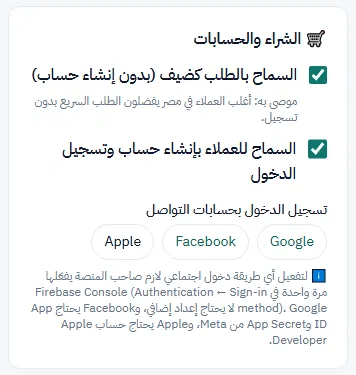
Settings → Store setup & recommended settings → 🛒 Checkout & accounts:
- Allow guest checkout (recommended) and Let customers create accounts and sign in. Never turn both off, or nobody can order. With guest checkout off, shoppers are sent to sign in before checkout.
- Under Social sign-in, tap Google, Facebook or Apple to switch each on or off; it saves at once.
What customers see
The store's sign-in and sign-up pages show "or continue with" and only the providers you enabled. A popup opens; Google shows "continue to tijar-app-c01u.firebaseapp.com" and Facebook shows the platform app name (Tigar), not your store name. The account is created in your store's customers.
Troubleshooting
- Nothing happens → the browser blocked the popup; allow popups for your store.
- Popup closes or "couldn't sign in" → the browser blocks third-party cookies (private Safari, in-app browsers of Facebook/Instagram): open the store in Chrome/Safari or sign in with mobile + password.
- On a custom domain, social sign-in may not work until the TIJAR team authorises the domain — contact us.
Related topics
Still have a question?
Our team answers on WhatsApp and can help you set up your store.