What exists today
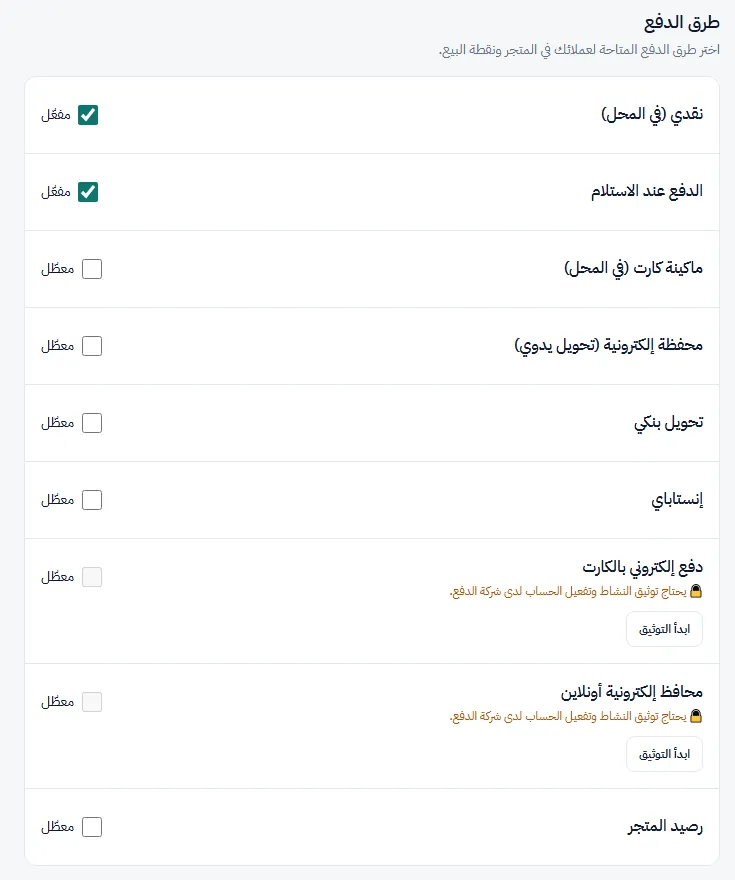
Everything is on one screen: Settings → Payment methods (owner, or a role with payment-settings permission).
- ✅ Cash on delivery — on for every new store. ✅ Cash (in store) — always accepted at the POS.
- ✅ Card machine (in store) — recorded by the cashier; no terminal integration.
- ✅ InstaPay, Mobile wallet (manual transfer), Bank transfer — the customer pays you directly.
- ✅ Store credit at the POS.
- ⏳ Online card and online wallets — coming soon; locked until a payment provider (e.g. Paymob) integration is live.
InstaPay, wallet or bank transfer
Tick the method and fill in the transfer details your customers see: InstaPay address or mobile; wallet number and type; or bank name, account holder and account number / IBAN — plus optional notes in Arabic, English and French. A live “This is what the customer sees” preview updates as you type. Press Save.
Customers now see these details automatically:
- At checkout when they choose the method — with copy buttons, the amount to transfer and “Write the order number in the transfer note”.
- After ordering on the “order received” page and the order tracking page — with the order number, the amount and a “Send the transfer proof on WhatsApp” button that opens your store’s WhatsApp with a ready message.
- In the order confirmation email.
Left empty, the customer sees “The store will contact you with transfer details” — send them yourself. Only these fields of enabled methods are shown; verification data never is. Proof screenshots arrive on WhatsApp (no in-store upload yet). When the money arrives, open the order → Record payment → method + reference → Save.
Business verification
Settings → Business verification: choose the business type, fill in the details, upload the commercial register, tax card (optional for freelancers), national ID (front/back) and bank proof (JPG, PNG or PDF), then Submit for review. Verification alone does not enable card payments.
Related topics
Still have a question?
Our team answers on WhatsApp and can help you set up your store.